Oz Smart Things
Oz Matter Power Point GPO
Couldn't load pickup availability
- We use Australia Post Carbon Neutral Shipping: 2-5 Days $9.99, 1-3 Days $15 or StarTrack Premium $20
- Order before Midday and we Dispatch the same day
- Found a Cheaper Price we will Match it
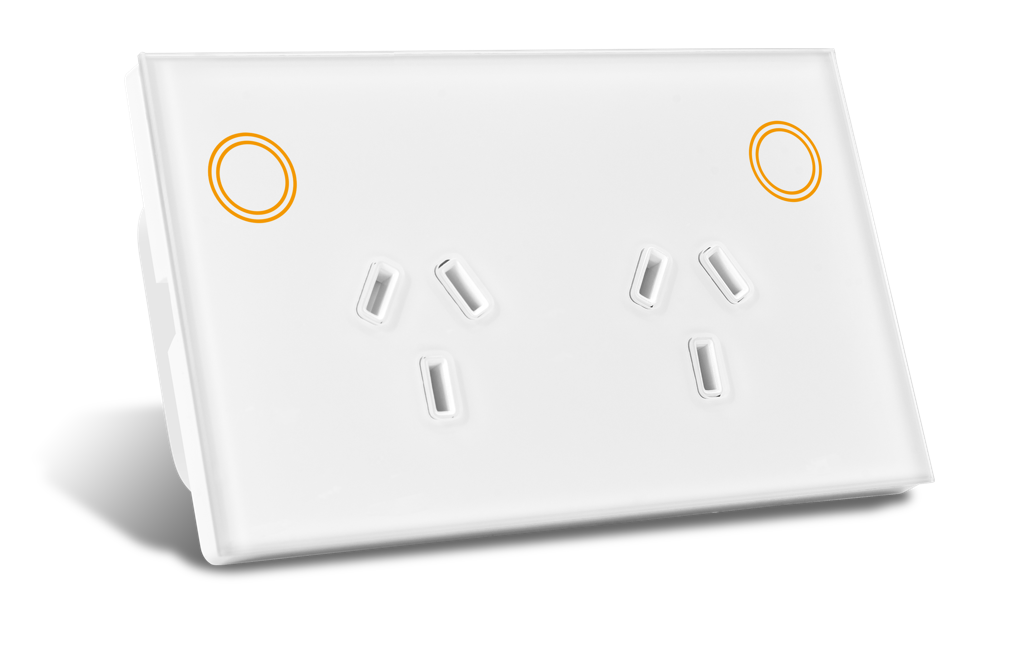
Matter Double Power Point (GPO)
Matter Smart Wall Switch Range – Premium Australian Design
Upgrade your home with the next generation Matter Smart Power Points, designed for Australian homes. This Double GPO brings all the benefits of Matter and Tuya compatibility into your everyday power outlets, making them smarter, safer, and more convenient.
Control each outlet independently via Tuya, Home Assistant, Apple HomeKit, Google Home, Alexa, or Samsung SmartThings. Automate appliances, manage energy use, and schedule devices to turn on or off without lifting a finger.
Unlike traditional smart plugs, this built-in GPO keeps your walls sleek and clutter-free, with a modern design to suit any home.
Key Features
- Matter-Enabled – Works with Apple HomeKit, Google Home, Alexa, and SmartThings.
- Independent Outlet Control – Switch each power socket on/off separately.
- Tuya App Integration – Remote control, automation, and scheduling.
- Child Lock Function – Prevent manual operation when needed.
- Australian Certified – RCM approved for safety and compliance.
- Seamless Look – Slim, modern design with flush mounting options.
Specifications
- Dimensions: Standard Australian GPO fit
- Input Voltage: 240V AC
- Frequency: Wi-Fi / Matter (2.4GHz)
- Certification: RCM
- Installation: Licensed electrician required
- Material: Fire-retardant ABS housing with tempered front panel
- Mounting Options: Standard wall box, plaster bracket, tile bracket, or joinery bracket
What’s in the Box
- 1x Matter Double Power Point (GPO)
- Mounting screws
- Instruction manual
Why Choose Matter Over Zigbee?
Unlike Zigbee power points, the Matter GPO connects directly to your smart ecosystem without needing a hub. That means faster response times, easier setup, and universal compatibility with leading platforms.
⚡ Perfect for kitchens, living rooms, and bedrooms – smart power built into your walls.
Share

Oz Matter Power Point GPO
Dont give the boxe's to your sparky - the QR code is on the bottom of the box on a sticker and not easily removable - the switches have no identification and so it is not possible to know whichg which QR code is applicable - caused a hassle when the sparky took everything out and installed them
The web site top menu when you click on "Matter" then says "Matter (Thread) Smart Home" - a often seen mistake but should not be made by a supplier as this just adds to the confusion as these switches are Matter over WiFi
Easy enough to join the switch to my Home Assistant following the instructions from them - but then comes in as a light not a power outlet . They respond with "Matter GPO and Matter light switch" currently use the same Matter device profile/software, this is not a useful response - is it an error by you or some "Matter master database" ? in any case how is it fixed, how do I get the power monitoring profile in
Overall I would not buy these
Thank you for taking the time to share your feedback. We’re sorry to hear about the trouble you experienced during installation and setup.
Regarding the QR code, each Matter device has its own unique QR code required for pairing. The QR code is located on the device itself, either on the back of the switch housing or under the faceplate.
To clarify, this GPO is listed as Wi-Fi / Matter (2.4GHz) on the product page, meaning it is a Matter over Wi-Fi device, not Matter over Thread. We understand your point that the menu wording “Matter (Thread)” may cause confusion, and we will review this wording to make the distinction clearer.
Regarding Home Assistant identifying the GPO as a light switch, this is due to the current Matter device profile/software supplied by the manufacturer. The GPO and Matter light switch currently use the same Matter device profile, which is why Home Assistant may display it as a light switch rather than a power outlet. We understand this is not ideal and will continue raising this with the manufacturer.
When adding to home assistant directly, they show up as light switches without any kind of power monitoring. When trying to add via Tuya app, they both just keep failing connecting to wifi. Think I will just go back to zigbee ones next time.
Thank you for your feedback, and we’re sorry to hear about the experience.
Regarding Home Assistant, the Matter GPO and Matter light switch currently use the same Matter device profile/software, which is why Home Assistant may identify the GPO as a light switch and may not currently expose the power monitoring entities directly. In the Tuya/Smart Life app, the interface is differentiated by the product ID instead. The device itself does support power monitoring within the Smart Life app.
For the Wi-Fi pairing issue, please ensure:
• Your phone is connected to a 2.4GHz Wi-Fi network
• Bluetooth is enabled on your phone
• The switch/GPO is in pairing mode by holding the button for 5 seconds until the indicator flashes rapidly
If you continue experiencing issues, please email help@ozsmartthings.com.au and we’ll be happy to assist further.
Need to use excessive pressure to insert plug into 2 of the three double outlets. Cant get one outlet to connect to home assistant ZBT-2 9 feet away through a timber floor. Trying to figure out how to get other two outlets to work in a mesh or confirm if they are allready in a mesh?
Thank you for your feedback and for sharing the issues you are experiencing.
Thank you for your feedback and for sharing your experience.
Regarding the outlets requiring excessive pressure when inserting plugs, the sockets do include child safety shutters which can feel firmer than standard outlets, however they should still operate smoothly without needing excessive force. If two outlets are noticeably tighter than the others, this may indicate a fault and we recommend contacting our support team so we can further assess this under warranty.-- You may email us at help@ozsmartthings.com.au
For the connectivity issue, the Oz Matter Double GPO with USB-C is a Matter over Wi-Fi device rather than Zigbee, so it will not connect through or extend a Zigbee mesh via your Home Assistant ZBT-2 coordinator.
We recommend checking:
That the device is connected to a stable 2.4GHz Wi-Fi network
Wi-Fi signal strength in the installation location
Distance and obstructions between the outlet and router/access point
That your Matter controller and Home Assistant are fully updated
The device works correctly on the Tuya app but initially finds it as a light switch. When directly enrolling it as a matter device it again only identifies itself as two light switches and no power usage is available which goes against the whole idea with Matter devices. No idea on how to fix the firmware fault.
Thank you for your feedback.
Yes, in the app the GPO is detected as a light switch.
Home Assistant identifies the GPO as a light switch because the Matter software used for light switches and GPOs is the same. As a result, they all appear as light switches in Home Assistant.
In the Tuya app, the interface can be differentiated using the product ID. In Home Assistant, you can rename the devices to easily distinguish between products.