Oz Smart Things
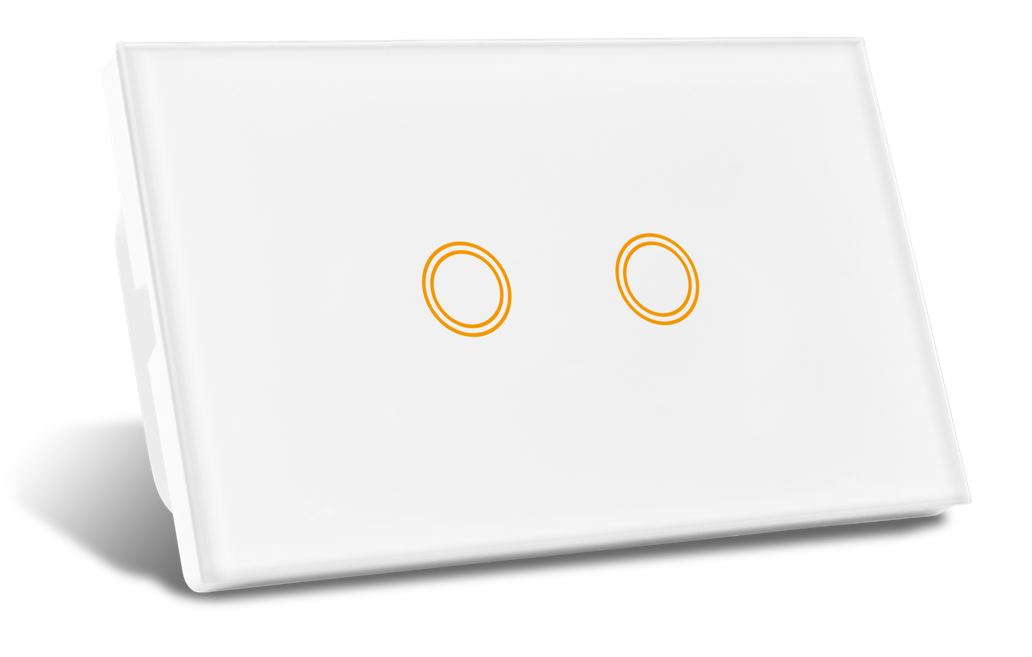
Oz Matter Double Light Switch
Oz Matter Double Light Switch
Couldn't load pickup availability
- We use Australia Post Carbon Neutral Shipping: 2-5 Days $9.99, 1-3 Days $15 or StarTrack Premium $20
- Order before Midday and we Dispatch the same day
- Found a Cheaper Price we will Match it
Matter Smart Double Gang Switch (2 Gang)
The Double Gang Matter Switch is ideal for kitchens, living rooms, or bathrooms where you want to control two lights or appliances independently. Each channel can be automated separately and upgraded with an optional dimmer module for brightness control.
⚡ Best choice for dual-light areas with smart automation flexibility.
Matter Smart Wall Switch Range – Premium Australian Design
Upgrade your home with the next generation Matter Smart Switch range, designed specifically for Australian homes. These switches deliver improved functionality, sleek appearance, and easier installation compared to our previous Zigbee models.
Whether controlled through Tuya, Apple HomeKit, Google Home, Alexa, or Samsung SmartThings, this switch gives you ultimate flexibility and future-proof reliability.
Key Features
- Matter-Enabled – Seamless compatibility with Apple HomeKit, Google Home, Alexa, and SmartThings.
- Customisable Backlights – Adjust colour and brightness of LED indicators.
- Child Lock Mode – Prevent manual switching when activated.
- True 2-Way Switching – Extra terminal ensures lag-free 2-way control.
- Optional Dimming – Add a dimmer module (sold separately).
- Range Options – Available from 1–6 gang, double GPO, and double GPO with USB-C.
- Flush Mounting Choices – Plaster, tile, or joinery brackets for a seamless look.
- Australian Designed & Certified – Built to AU standards with RCM certification.
Specifications
- Dimensions: 120 x 72 x 42 mm
- Input Voltage: 240V AC
- Frequency: Wi-Fi / Matter (2.4GHz)
- Max Load per Gang:
- Fluorescent: 2.6A (625W)
- LED: 1.67A (400W)
- Certification: RCM
- Installation: Licensed electrician required
- Material: Fire-retardant ABS with tempered glass touch panel
- Mounting Options: Standard wall box, plaster bracket, tile bracket, or joinery bracket
What’s in the Box
- 1x Matter Smart Switch
- Mounting screws
- Instruction manual
Why Choose Matter Over Zigbee?
Unlike Zigbee models, the new Matter range integrates directly with your smart home ecosystem without requiring a hub. Enjoy faster response, universal compatibility, and more flexibility when mixing devices from different brands.
⚡ Perfect for Australian bedrooms and small spaces – sleek, safe, and reliable.